Most guidance on after-hours support explains what to buy. This covers what actually happens once you have it — the mechanics of an out-of-hours incident from the call to resolution, and what determines whether it goes well.
The first few minutes
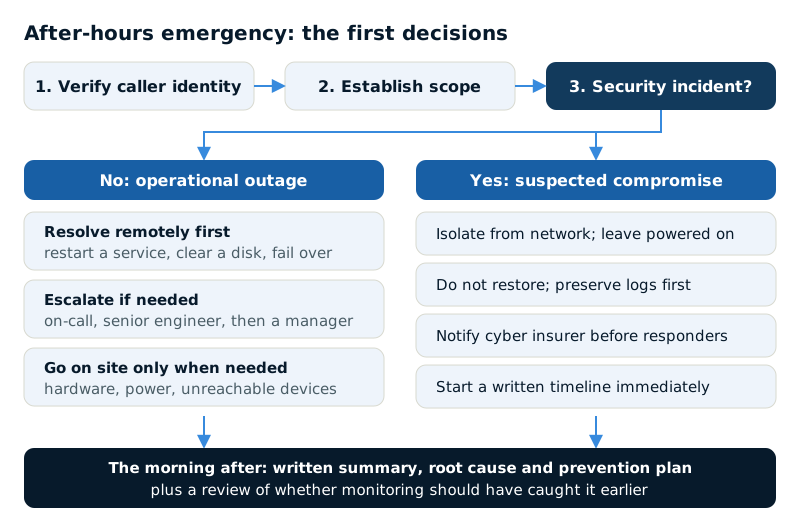
When an emergency call comes in outside business hours, a competent provider is doing three things before touching anything technical.
Confirming identity, first. Out-of-hours calls are a known social engineering vector — an attacker calling an on-call engineer, claiming urgency, asking for a password reset or an account unlock. A provider who does not verify who they are speaking to has a serious gap, and the verification step is a good sign rather than an obstruction.
Establishing scope, second. One person affected or everyone? One site or all of them? This determines whether it is genuinely an emergency and what resources to pull in.
Determining whether it is a security incident, third. This changes everything downstream — the response, who gets notified, whether the insurer needs to be involved, and critically whether systems should be isolated rather than restarted.
Why remote-first is the right instinct
The overwhelming majority of out-of-hours incidents are resolved remotely, and that is a feature rather than a compromise. Remote work starts in minutes rather than after a drive.
Typical overnight resolutions: restarting a failed service, clearing a full disk, failing over to a secondary connection, restoring a deleted file, unlocking accounts, reversing a failed update.
Physical presence becomes necessary for hardware failure, a network device that will not respond remotely, power or environmental problems, or anything requiring someone to look at a physical indicator light. For businesses running mostly cloud infrastructure this is rare, which is a large part of why cloud migration reduces out-of-hours cost as well as risk.
Escalation
The first responder overnight is usually a generalist. Complex incidents require escalation, and the shape of that path matters more than the initial response time.
A mature provider has a defined ladder: on-call engineer, then a senior engineer or specialist, then a manager with authority to make commercial decisions — approving emergency hardware, engaging a vendor's paid emergency support, authorising overtime.
Ask about the third rung specifically. Some incidents stall not because nobody can fix them but because nobody available can authorise the spend required. That is an organisational failure that looks like a technical one.
What you should do before it happens
Most of what determines a good outcome is arranged in advance, during business hours.
- Know the emergency number and make sure your staff do. Not the general support address — the specific out-of-hours route. Put it somewhere accessible when systems are down, which means not only on the intranet.
- Agree who can declare an emergency. Without this, either nobody calls when they should, or everyone calls for everything.
- Maintain a current contact list at the provider. Out-of-hours verification depends on them knowing who is authorised.
- Confirm what is covered and what is billed, so the person deciding at 11pm is not weighing an unknown cost.
- Keep a paper copy of critical contacts. When email and systems are down, the contact list stored in them is unreachable.
That last point sounds old-fashioned and comes up in nearly every serious incident review.
Security incidents are different
If the out-of-hours call concerns suspected compromise, the response changes materially:
- Isolate rather than power down. Disconnect from the network but leave systems running — memory holds forensic evidence lost on shutdown.
- Do not begin restoring. Restoring into an environment where an attacker retains access simply provides clean data to encrypt.
- Notify your cyber insurer before engaging responders. Most policies require carrier notification and the use of approved vendors; acting first can jeopardise the claim.
- Preserve logs before anything is rebuilt.
- Start a written timeline immediately. You will need it for the insurer, possibly for regulators, and to establish what was accessed.
This is why the initial triage question about whether an incident is security-related matters so much. The instinctive response to an outage — restart it, restore it, get running — is close to the worst possible response to a compromise.
| Step | Operational outage | Suspected compromise |
|---|---|---|
| First instinct | Restart the failed service | Isolate from the network, leave it running |
| Power | Restart if it helps | Do not power down; memory holds evidence |
| Restore | Restore as soon as possible | Do not restore until access is removed |
| Who to call | Escalate within the provider | Cyber insurer before engaging responders |
| Records | Summary after resolution | Written timeline from the start; preserve logs |
The morning after
A provider operating properly does not close an out-of-hours incident at restoration. There should be a written summary of what happened, what was done, and what the root cause was; a plan to prevent recurrence; and, for anything significant, a review of whether monitoring should have caught it earlier.
That last question is the one worth asking every time. Most out-of-hours emergencies are the visible end of something that was detectable earlier — a disk filling gradually, a service failing intermittently, hardware reporting warnings for weeks. If the incident was genuinely unforeseeable, that is a legitimate answer. If it was not, the monitoring configuration needs work, and that conversation is worth more than the fix itself.