HIPAA compliance is frequently sold as a product, which it is not. There is no certification, no approved vendor list, and no software that makes a practice compliant. There is a rule, a set of required safeguards, and an obligation to document that you have implemented them.
This checklist covers the IT portion — the Security Rule, which governs electronic protected health information. It does not cover the Privacy Rule or the administrative obligations that sit outside technology.
The distinction that matters most
The Security Rule divides its implementation specifications into two categories, and misunderstanding this is the most common compliance error in small practices.
Required specifications must be implemented. There is no discretion.
Addressable specifications must be assessed. If you determine one is not reasonable and appropriate for your practice, you must document why, and implement an equivalent alternative measure where reasonable.
Addressable does not mean optional. A practice that skipped encryption without documenting the assessment has not exercised a permitted choice — it has failed to meet the standard. In enforcement actions this distinction appears repeatedly.
The risk analysis — start here
A documented, accurate, thorough risk analysis covering every system that creates, receives, maintains or transmits electronic protected health information. This is a required specification, and it is the foundation for everything else, because the rule expects your other decisions to follow from it.
It is also the single most commonly cited failure in HHS Office for Civil Rights enforcement actions. Practices that suffered a breach frequently discover the penalty relates less to the breach itself than to never having performed an adequate risk analysis in the first place.
A risk analysis is not a vulnerability scan and not a checklist someone sold you. It requires identifying where the data lives, what threatens it, how likely each threat is, what the impact would be, and what you are doing about it. It needs revisiting when your environment changes materially, and reviewing at least annually is the practical standard.
Technical safeguards checklist
- Unique user identification (required). Every user has their own account. Shared logins at the front desk are a direct violation and remain extremely common.
- Automatic logoff (addressable). Sessions terminate after inactivity — particularly on workstations in clinical areas.
- Encryption at rest (addressable). Full disk encryption on every laptop, desktop and server holding ePHI. If not implemented, the assessment must be documented.
- Encryption in transit (addressable). Email containing ePHI, remote access, and any data crossing a network.
- Audit controls (required). Systems must record and examine activity. Logging that nobody reviews satisfies the letter and not the intent.
- Integrity controls (addressable). Mechanisms to confirm ePHI has not been improperly altered or destroyed.
- Access control (required). Users see only what their role requires. The front desk does not need clinical records access.
Encryption deserves particular emphasis, because of the breach notification safe harbour: if lost or stolen data was properly encrypted, it generally does not constitute a reportable breach. A stolen encrypted laptop is an inconvenience. A stolen unencrypted one is a notification event with regulatory consequences.
| Safeguard | Status | In practice |
|---|---|---|
| Unique user identification | Required | Every user has their own login; no shared front-desk accounts |
| Access control | Required | Users see only what their role needs |
| Audit controls | Required | Activity is recorded and reviewed |
| Automatic logoff | Addressable | Sessions end after inactivity, especially in clinical areas |
| Encryption at rest | Addressable | Full disk encryption on laptops, desktops and servers holding ePHI |
| Encryption in transit | Addressable | Email with ePHI, remote access, data crossing networks |
| Integrity controls | Addressable | Confirm ePHI has not been improperly altered or destroyed |
Administrative safeguards checklist
- A designated security official (required). A named individual responsible for the security programme. This can be an existing staff member but it must be someone specific.
- Workforce training (required standard), delivered and documented, with records of who completed what and when.
- Access management (required standard) — procedures for granting, reviewing and, critically, terminating access. Departed staff with live accounts is a routine audit finding.
- Contingency plan (required). Data backup plan, disaster recovery plan, and emergency mode operation plan. All three are named in the rule.
- Periodic evaluation (required). Technical and non-technical assessment, repeated as your environment changes.
- Incident response procedures (required), documented before you need them.
Business Associate Agreements
Any vendor that creates, receives, maintains or transmits ePHI on your behalf requires a Business Associate Agreement. This includes your IT provider, your cloud backup vendor, your EHR host, your billing company, and frequently your shredding service.
Two practical points. A vendor who will not sign a BAA cannot handle your ePHI — that is the end of the analysis. And a BAA does not transfer your liability; you remain responsible for due diligence on who you engage.
It is worth auditing this annually. Vendor relationships accumulate quietly, and practices routinely discover a service handling patient data with no agreement in place.
Physical safeguards
Frequently overlooked because they are not technical:
- Facility access controls — who can physically reach servers and network equipment
- Workstation positioning so screens are not visible from waiting areas
- Device and media controls covering disposal and reuse. A hard drive leaving the practice must be sanitised, and this includes leased copiers, which store scanned images
Breach notification
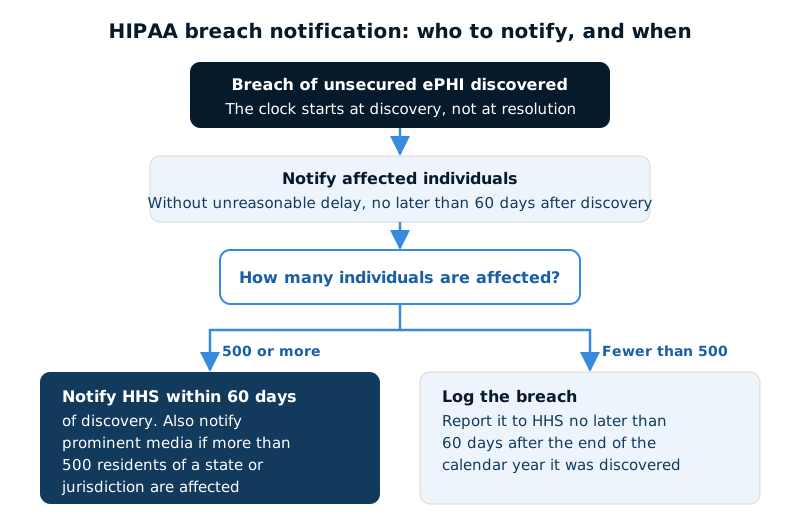
If a breach of unsecured ePHI occurs, notification to affected individuals is required without unreasonable delay and no later than 60 days from discovery. Breaches affecting 500 or more individuals additionally require notification to HHS within the same window, and to prominent media where more than 500 residents of a state or jurisdiction are affected.
Smaller breaches are logged and reported to HHS annually. The clock starts at discovery, not at resolution, which is why the incident response procedure needs to exist beforehand.
What auditors actually find
Across enforcement actions the recurring pattern is consistent, and it is rarely exotic:
- No risk analysis, or one that is generic, stale, or does not cover the whole environment
- Unencrypted laptops and portable media
- Terminated employees retaining system access
- Missing Business Associate Agreements
- Training delivered but never documented
- No contingency plan, or one that has never been tested
None of these require sophisticated technology to fix. They require someone owning the programme and documenting the work — which is the part practices most often assume their IT provider is handling, and should confirm rather than assume.
Sources
- U.S. Department of Health and Human Services — Summary of the HIPAA Security Rule
- Electronic Code of Federal Regulations (eCFR) — 45 CFR Part 164 Subpart C — Security Standards for the Protection of Electronic Protected Health Information
- U.S. Department of Health and Human Services — Guidance on Risk Analysis
- U.S. Department of Health and Human Services — HHS’ Office for Civil Rights Settles Four HIPAA Security Rule Ransomware Investigations
- U.S. Department of Health and Human Services — Breach Notification Rule