Onboarding is where a managed IT relationship is actually made or broken. It is also where most of the provider's initial effort goes, and where a business gets its first honest look at the state of its own environment.
Knowing what should happen lets you tell the difference between a provider working through a defined process and one improvising.
Week 1 — Discovery
A competent provider documents your environment themselves rather than trusting whatever they inherited. They should be cataloguing:
- Every device: age, specification, operating system, warranty status, who uses it
- Servers, network equipment, firewalls and their configurations
- Cloud tenants, licence counts and assignments
- Every application the business depends on, and who the vendor is
- Backup configuration and, separately, whether it actually works
- Who has administrative access to what
- Internet connectivity, contracts and renewal dates
You should be asked a lot of questions this week, including some nobody has asked before — which applications genuinely cannot go down, who approves spending, what happened the last time something broke badly.
If this phase is skipped or compressed into a phone call, that is the clearest warning sign available. Everything downstream depends on it.
Week 2 — Tooling and access
Management agents deployed to every device, ticketing configured, documentation platform populated, and the provider's own access established and secured.
Two things worth confirming during this week. First, that the provider's administrative access into your environment is protected by MFA — their access is a privileged path into your business. Second, that you retain ownership of your tenants, domains and licences rather than them sitting under the provider's account.
You should also get a named point of contact and a clear explanation of how to raise a ticket, including what counts as an emergency and how to reach someone outside hours.
Weeks 2 to 3 — The remediation list
This is the part clients are least prepared for. Discovery produces a list of problems, and it is usually longer than expected.
Common findings:
- Operating systems past end of support, still in production
- Hardware years beyond its service life
- Backups running but never verified, or not covering what matters
- Former employees with active accounts
- Shared administrative credentials
- MFA absent, or present on email only
- Legacy authentication protocols still enabled
- Software licensed to individuals rather than the business
- No documentation of anything
None of this was created by the transition. It accumulated, and the new provider is the first party in years with both the mandate and the motive to look. Expect this work to be quoted separately from the monthly fee — a provider who absorbs it silently is either not doing it or has priced it into a figure you did not see.
Weeks 3 to 4 — Parallel running
If you are switching from another provider, both should have access during this period. The new provider begins taking tickets while the outgoing one remains available for escalation and knowledge transfer.
This overlap is the single most valuable protection in a transition, and it is the first thing sacrificed when a business is in a hurry or the outgoing relationship has soured. Insist on it where you can.
Weeks 4 to 6 — Handover and stabilisation
Outgoing provider access revoked. Every credential they held rotated — administrative accounts, service accounts, network devices, cloud tenants, vendor portals. Ask for written confirmation when this is complete.
Ticket volume typically rises during this period rather than falling, for two reasons. Staff who had given up reporting problems start reporting them again, and the new provider is actively surfacing issues rather than waiting. A spike here is a sign of the process working, not failing.
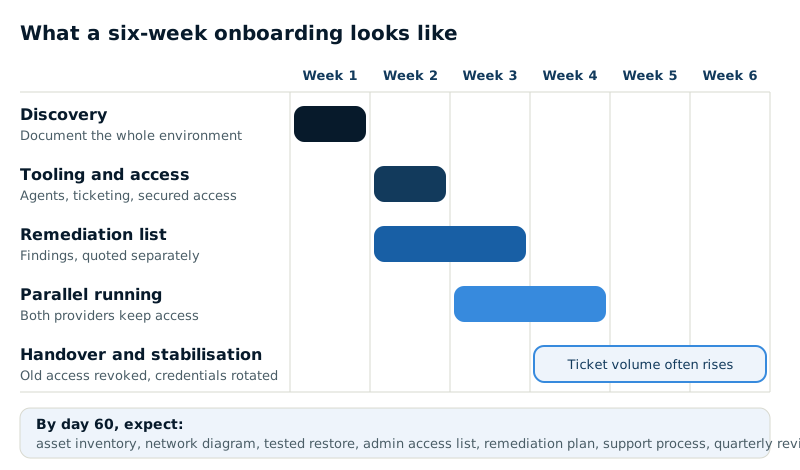
What you should have at the end
- A complete asset inventory with an age and replacement profile
- A network diagram reflecting what actually exists
- Documented backup configuration and evidence of a successful test restore
- A current list of who holds administrative access
- A remediation plan, prioritised, with costs and dates
- A defined support process your staff understand
- A scheduled recurring review — quarterly is typical
If any of these are missing 60 days in, ask why. They are the deliverables that distinguish a managed relationship from a support contract, and they are reasonable to expect.
| Deliverable | Where it comes from |
|---|---|
| Asset inventory with age and replacement profile | Week 1 discovery |
| Network diagram of what actually exists | Week 1 discovery |
| Backup configuration plus a successful test restore | Discovery and remediation |
| Current list of who holds admin access | Discovery, then credential rotation at handover |
| Prioritised remediation plan with costs and dates | Weeks 2 to 3 remediation list |
| Support process your staff understand | Week 2 tooling and access |
| Scheduled recurring review (quarterly is typical) | Set up once onboarding settles |
How to make it go well
- Give them a decision-maker. Onboarding generates questions that need business answers, not technical ones.
- Be honest about what you know is broken. Providers find it anyway, and starting with a candid list saves everyone time.
- Tell your staff what is happening and why. Most transition complaints are communication failures.
- Do not schedule it against your busiest period.
- Budget for remediation before you start, so the list is a plan rather than a shock.