Most migration plans are built around technical dependencies and then squeezed into whatever dates are left. The better approach inverts that: establish the business constraints first, because they are genuinely immovable, and sequence the technical work within them.
Start with when you cannot do it
Before any technical planning, map the periods when disruption is unacceptable. For most businesses there are more of these than anyone initially remembers:
- Sector peak — the first quarter for accounting firms, the fourth for retail, enrolment periods for education
- Month-end and quarter-end close, every month
- Payroll runs
- Known contractual or filing deadlines
- Audits and inspections
- Holiday periods, which cut both ways — quiet enough to be attractive, and thin on the staff needed to respond if something goes wrong
That final point is worth weighing carefully. The Christmas period looks ideal because nobody is working, and it is a poor choice if the two people who understand the environment are away and vendor support is running a skeleton service.
Realistic durations
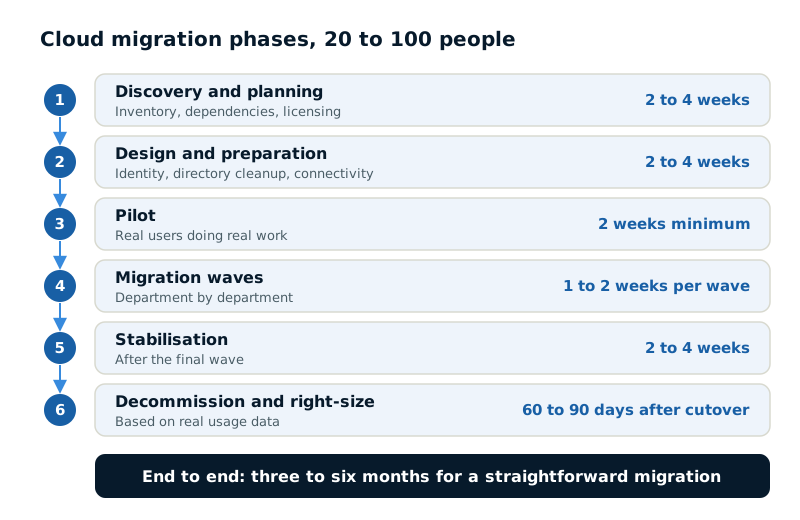
For a business of 20 to 100 people, planned properly:
- Discovery and planning — 2 to 4 weeks. Compressing this is the most expensive saving available.
- Design and preparation — 2 to 4 weeks. Identity design, directory cleanup, licensing, connectivity.
- Pilot — 2 weeks minimum. Real work, real users, long enough for the second-week problems to surface.
- Migration waves — 1 to 2 weeks each, depending on group size.
- Stabilisation — 2 to 4 weeks after the final wave.
- Decommissioning and right-sizing — 60 to 90 days after cutover.
End to end, three to six months for a straightforward migration. Anyone promising a full server and email migration in a fortnight is either describing something much smaller than you think, or planning to discover the problems during cutover.
Sequencing the workloads
Order matters, and there is a defensible sequence that most migrations should follow:
- Identity first. Nearly everything depends on it, and getting it wrong late is extremely expensive.
- Email second. Highly visible, well-understood, and it demonstrates progress to the business early.
- File storage third. Straightforward technically, but requires user behaviour change, so allow time for adoption.
- Line-of-business applications fourth, in order of increasing criticality. Learn on something the business can survive being awkward for a day.
- The most critical system last, when the team has done this several times in your environment specifically.
The instinct is often to move the most painful system first, to get it over with. That is the wrong order — it means attempting the highest-risk work with the least experience of how your environment behaves under migration.
Wave planning
How you group users matters more than how many are in each wave.
- First wave: IT, plus a few tolerant volunteers. People who will report problems constructively rather than escalating.
- Second wave: one complete department. Complete matters — splitting a team across two environments creates collaboration problems that are not migration problems but will be blamed on the migration.
- Subsequent waves: department by department, keeping teams that work closely together in the same wave.
- Last wave: executives and anyone whose disruption creates disproportionate noise.
Leave at least a few days between waves to absorb the support load and fix what the previous wave surfaced. Back-to-back waves mean carrying the same problem forward repeatedly.
| Wave | Who moves | Why |
|---|---|---|
| First | IT plus a few tolerant volunteers | They report problems constructively |
| Second | One complete department | Splitting a team creates collaboration problems |
| Subsequent | Department by department | Close collaborators stay in the same wave |
| Last | Executives and other high-visibility roles | Their disruption creates disproportionate noise |
Choosing the cutover window
For anything requiring a hard switchover, the window needs to accommodate the work, the verification, and the rollback if needed.
- Friday evening through Sunday is the standard choice, giving two days of contingency before staff return.
- Confirm vendor support availability during the window. Weekend support from a critical vendor is not guaranteed and is worth arranging in advance.
- Set a decision point — a specific time by which, if the migration is not verified working, you roll back. Decide this before you start, when everyone is calm.
- Plan for staff on the following Monday. First-day-back support demand is significant and is largely people not knowing rather than things being broken.
Building in the slack
Two categories of delay recur often enough to plan for.
External lead times you do not control: connectivity orders at 30 to 90 days, hardware supply, vendor licensing conversations, and third-party professional services availability. Start these first, regardless of where they sit in the technical sequence.
And remediation from discovery. Discovery reliably finds problems that must be resolved before migration — unsupported systems, licensing issues, applications that cannot move. Budget both time and money for this, because a plan with no allowance for it will slip at the first finding, and every subsequent date moves with it.