Office IT projects fail on scheduling far more often than on technology. The work itself is routine; the lead times are not, and they are discovered late because they feel administrative rather than technical.
This guide is sequenced by when things must start rather than by topic, because that is what determines whether you open on time.
Before signing the lease
Two checks belong here, before the space is committed.
First, confirm what connectivity is actually available at that specific address. Not in the area — at the address. Carrier coverage maps are optimistic, and a building without existing fibre may require construction with a lead time measured in months and a cost that occasionally exceeds the fit-out.
Second, understand the building's rules. Commercial buildings, particularly in New York City, frequently have requirements that materially affect the project: approved vendor lists, certificate of insurance requirements, freight elevator scheduling, restricted working hours, and in some buildings union labour requirements for cabling. Discovering these after signing removes your options.
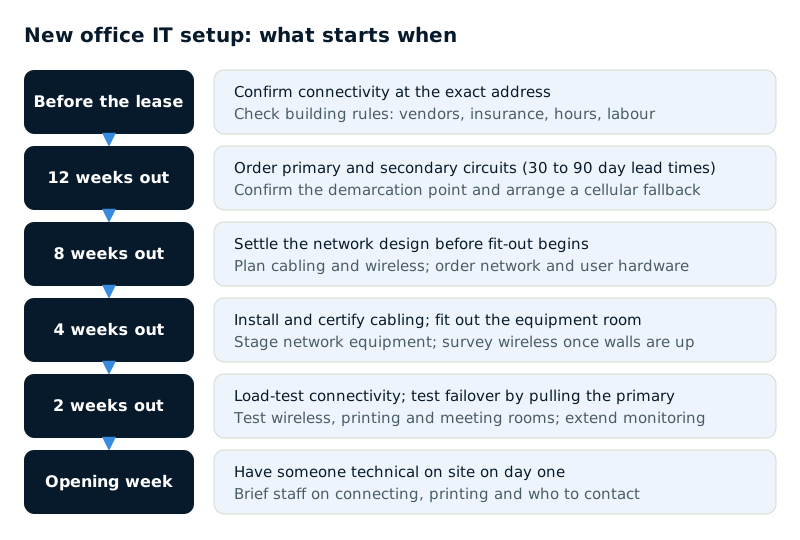
Twelve weeks out — order connectivity
This is the longest lead item and should be ordered as soon as the lease is signed. Thirty to ninety days is normal for business circuits, and longer where construction is required.
- Order the primary circuit, sized for the number of people and how cloud-dependent the business is
- Order a secondary circuit from a different carrier, ideally over a different physical path into the building
- Confirm the demarcation point and who is responsible for getting the connection from there to your space — this boundary causes more delays than any technical issue
- Get installation dates in writing and treat them as optimistic
A temporary fallback — a cellular router — costs little and prevents the scenario where the office is ready and the circuit is not. It is worth arranging regardless of how confident the carrier sounds.
Eight weeks out — design and order
The network design should be settled before fit-out begins, because cabling is far cheaper to place correctly than to move.
- Decide where the equipment will live. A dedicated room or secure cabinet with ventilation and clean power, not a cupboard.
- Plan cable runs and outlet positions, with more capacity than you think you need. Adding outlets later costs several times what including them now does.
- Plan wireless coverage properly — access point placement based on the floor plan and construction materials rather than guesswork.
- Order network equipment, allowing for supply lead times which remain unpredictable.
- Order end-user hardware, configured centrally before delivery where possible.
Four weeks out — the physical work
- Cabling installed and, importantly, tested and certified rather than merely terminated
- Equipment room fitted out — rack, power, ventilation, and physical security on the door
- Network equipment configured, ideally staged and tested off-site before installation
- Wireless installed and surveyed once walls and furniture are in place, since both change coverage substantially
- Printers, meeting room technology and any physical access control installed
Insist on cable certification results. Untested cabling produces intermittent faults that are extremely difficult to diagnose later and are trivial to catch now.
Two weeks out — systems and testing
- Connectivity live and tested under realistic load, not just confirmed as present
- Failover to the secondary circuit tested by actually disconnecting the primary
- Wireless tested throughout the space, including the corners nobody thought about
- Devices deployed to desks and verified
- Printing tested from several machines
- Meeting room technology tested with a real call, not a local check
- Security policies confirmed as applying at the new site
- Monitoring extended to cover the new location
Opening week
Have someone technical present on the first day. Not because something is likely to be broken, but because the first day surfaces everything the testing did not: the desk with no signal, the printer nobody can find, the person whose access was set up for the wrong site.
Also brief staff before they arrive — how to connect, how to print, who to contact. A significant share of first-week tickets are people not knowing rather than things not working.
The mistakes that recur
- Ordering connectivity late. The most common cause of an office opening without working internet.
- Under-provisioning cabling because it seems expensive at the time.
- Treating wireless as an afterthought, then discovering coverage problems after the walls are up.
- Forgetting the equipment room needs power, ventilation and security.
- Not testing failover, so the redundant circuit turns out never to have worked.
- Skipping cable certification.
- Not budgeting for someone on site on day one.
| Mistake | Prevention |
|---|---|
| Ordering connectivity late | Order circuits as soon as the lease is signed |
| Under-provisioning cabling | Add outlets during fit-out, not after |
| Wireless as an afterthought | Plan placement from the floor plan; survey after fit-out |
| Neglected equipment room | Plan power, ventilation and a secure door |
| Untested failover | Disconnect the primary circuit and confirm |
| Skipping cable certification | Insist on certification results |
| Nobody on site on day one | Budget for a technical person at opening |