Nearly every business hit by ransomware had backups. The ones that recover quickly and the ones that pay are separated not by whether backups existed but by whether they survived the attack.
Competent ransomware operators locate and destroy backups before encrypting anything, because backups are the only thing standing between them and payment. Any backup reachable from the production network using credentials they have stolen is part of the target, not the recovery plan.
What gets destroyed first
Before encryption begins, the reconnaissance phase looks specifically for:
- Backup servers and appliances on the network
- Network shares holding backup files
- Volume shadow copies, which are deleted with a single command and are frequently the only thing businesses were relying on
- Cloud backup consoles, accessed with credentials harvested from a compromised administrator
- Attached external drives, which are encrypted like any other volume
- Replication targets, which faithfully replicate the encryption
That last point catches people out repeatedly. Replication is not backup. A replicated copy of encrypted data is encrypted data in two places, delivered promptly.
Immutability is the control that matters
An immutable backup cannot be modified or deleted for a defined retention period — not by an attacker, not by a compromised administrator, not by the backup software itself, and not by you. The restriction is enforced by the storage layer rather than by permissions.
This is the single most important characteristic for ransomware survival, because it holds even when the attacker has complete control of your environment and full administrative credentials.
Implementations you will encounter:
- Object storage with an object lock in compliance mode, which even the account owner cannot override during the retention window
- Backup appliances with hardened immutable repositories
- Cloud backup services offering immutable retention as a configurable option
- Tape, which is genuinely offline once removed from the drive and remains a legitimate answer despite feeling dated
The detail worth checking: governance mode versus compliance mode. Governance mode allows a sufficiently privileged account to remove the lock, which means a compromised administrator can remove it. Compliance mode cannot be overridden by anyone. For ransomware protection, the distinction is the whole point.
| Object lock mode | Who can remove the lock during retention | Survives a compromised administrator? |
|---|---|---|
| Governance mode | Any account granted the special bypass permission | No: a privileged account can remove it |
| Compliance mode | Nobody, including the account owner | Yes |
The rule, updated
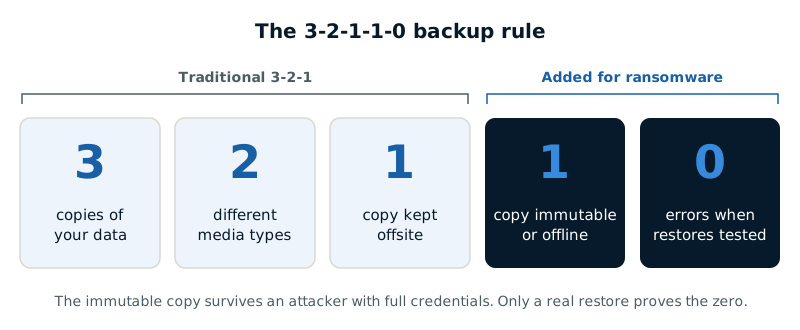
The traditional 3-2-1 rule — three copies, on two media types, one offsite — predates ransomware and is no longer sufficient on its own. The current formulation adds two conditions:
3-2-1-1-0: three copies, two media types, one offsite, one immutable or offline, and zero errors on verification.
The added items carry most of the weight. The immutable copy is what survives an attacker with full credentials. The zero-errors requirement is what distinguishes a backup that exists from one that works, and it can only be established by restoring.
Testing, properly
A backup job reporting success confirms the job completed. It does not confirm the data is usable, complete, or recoverable within a timeframe your business can survive.
Meaningful testing means:
- Restore actual data to an isolated environment and open it. Not a verification checksum — open the files and confirm the applications work.
- Time it. Recovery time is the number that matters during an incident, and it is almost always longer than people assume. Restoring several terabytes over a network connection takes as long as it takes.
- Test a full system restore, not just files. Recovering a working server is a different exercise from recovering documents.
- Test with production credentials unavailable, since in a real incident your directory may be compromised or destroyed. If your recovery process depends on logging into a domain that no longer exists, it is not a recovery process.
- Document the results, with dates. Insurers and auditors ask, and it is the evidence that the capability is real.
| Test | What it proves |
|---|---|
| Restore real data to an isolated environment and open it | The data is usable, not just present |
| Time the restore | Your real recovery time |
| Restore a full system, not just files | You can recover a working server |
| Restore without production credentials | Recovery works if your directory is compromised |
| Record results with dates | Evidence for insurers and auditors |
What people forget to back up
- Microsoft 365 and Google Workspace data. Both operate shared responsibility models in which they provide availability and you are responsible for data protection. Retention policies are not backup, and this is one of the most widespread gaps in small business environments.
- Cloud-hosted line-of-business applications, where the vendor's backup may not offer point-in-time recovery for your data alone.
- Configuration — firewall rules, network device configs, application settings. Restoring data onto infrastructure you have to rebuild from memory extends recovery dramatically.
- Endpoints. Laptops holding local files that were never synced.
- The documentation needed to perform a restore, which is frequently stored in the systems being restored.
That last one is a recurring problem in real incidents. Recovery procedures stored only in the encrypted document management system are unavailable exactly when needed. Keep a copy somewhere independent.
Recovery is not only restoration
Two points that determine whether a restore actually resolves the incident.
First, do not restore into a compromised environment. If the attacker retains persistence, restoring provides them fresh data to encrypt. The environment must be confirmed clean, and where compromise is suspected but unproven, rebuilding is safer than cleaning.
Second, backups do not address exfiltration. Modern operations copy data out before encrypting, which means a perfect restore still leaves you facing a threat to publish, and the notification obligations that follow from data having left. Backups solve the availability problem entirely and the confidentiality problem not at all.
Which is the honest summary: isolated, tested, immutable backups are what determine whether ransomware is a bad week or an existential event. They are not a complete answer to ransomware, and nothing else comes close to their effect on the outcome.