The popular image of ransomware is a sudden event: a screen goes red, files lock, a demand appears. That is the final act. By the time it happens the attacker has usually been in the network for days or weeks, and almost everything that determines how bad the outcome will be has already occurred.
Understanding the sequence is what makes prevention tractable, because the chain has several points where it can be broken — and most of them are well before the encryption.
How it actually unfolds
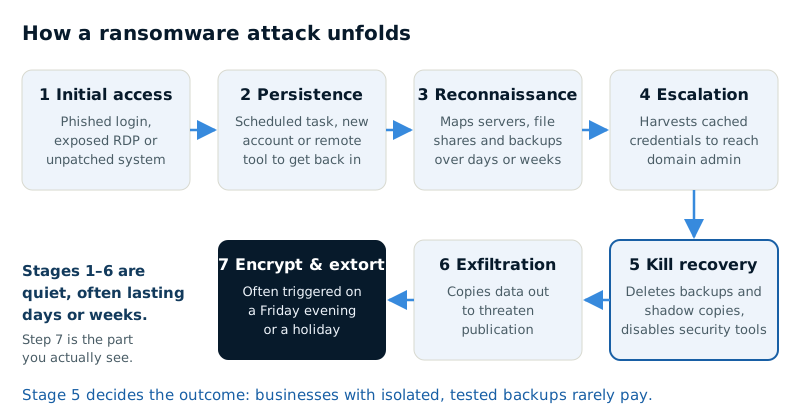
Initial access
Most commonly one of three routes: a phished credential, an exposed remote access service, or an unpatched internet-facing vulnerability. Occasionally a compromised vendor with legitimate access to your environment.
The credential route dominates for small businesses, and it is why MFA has an outsized effect on ransomware risk specifically rather than just on account security generally.
Establishing persistence
The attacker secures a way back in that survives a password change or a reboot — a scheduled task, a new account, a remote access tool installed to look like legitimate administration. This is why simply resetting a password after suspicious activity often fails to remove them.
Reconnaissance
Quiet exploration, often over days or weeks. Mapping the network, identifying servers, locating file shares, and finding backups. They are learning what matters to you and what will hurt most to lose.
Privilege escalation
Moving from an ordinary user account to administrative control, commonly by harvesting credentials cached on compromised machines. Domain administrator access is the objective, because it makes everything after it trivial.
Destroying recovery options
This is the step most businesses do not anticipate, and the one that determines the outcome. Before encrypting anything, competent operators delete backups, corrupt volume shadow copies, and disable security tooling. Backups reachable with domain credentials are deleted along with everything else.
Data exfiltration
Modern operations copy data out before encrypting. This produces the second lever: even if you restore cleanly, they threaten to publish. This is why "we have good backups" is no longer a complete answer to ransomware.
Encryption and extortion
Usually triggered outside business hours — a Friday evening, a public holiday — to maximise the time before anyone notices.
The first hours
What you do immediately materially affects the outcome:
- Isolate rather than power down. Disconnect affected systems from the network but leave them running — memory contains forensic evidence that is lost on shutdown, and sometimes encryption keys.
- Notify your cyber insurer before engaging anyone. Most policies require carrier notification and the use of panel vendors. Engaging your own responders first can jeopardise the claim.
- Assume credentials are compromised. Every administrative password, every service account.
- Preserve evidence. You will need it for insurance, for regulators, and to determine whether data left the building.
- Do not restore immediately. Restoring into an environment where the attacker still has persistence simply gives them a second attempt against clean data.
That last point is the most frequently violated. The urge to get the business running is overwhelming, and restoring before the environment is confirmed clean is how organisations get encrypted twice.
On paying
Payment is a business decision rather than a moral one, and it is worth understanding what it does and does not achieve.
Decryption tools supplied by attackers frequently work poorly. They are slow, they fail on some files, and recovery using them commonly takes longer than restoring from backup. Payment also does not undo exfiltration — you are purchasing a promise to delete data from people who just extorted you, and repeat demands are documented.
There is also a sanctions dimension. Payments to certain sanctioned entities carry legal exposure in the United States, and this is precisely why panel counsel exists and why insurers require their involvement.
The practical reality is that businesses with tested, isolated backups rarely pay, and businesses without them frequently do. The decision is largely made months in advance, by the state of the backups.
The controls that actually break the chain
Mapped against the sequence above, in order of impact:
- MFA everywhere, including remote access and administrative accounts. Removes the most common initial access route.
- No remote desktop exposed directly to the internet. If remote access is required, it belongs behind a VPN or a zero-trust broker.
- Immutable or offline backups. Backups that cannot be deleted with domain credentials are the single most important control for outcome severity, as opposed to likelihood.
- Tested restores. A backup nobody has restored is a hypothesis.
- EDR with monitoring. The reconnaissance and escalation phases are noisy and detectable — if somebody is watching.
- Patch discipline on internet-facing systems, prioritised over everything else.
- Least privilege. Users who are local administrators make escalation trivial.
- Network segmentation, so reaching one machine does not mean reaching all of them.
- Security awareness training, targeting the phishing that starts most of these.
Notice how many of these address the middle of the chain rather than the beginning. Preventing every initial access is unrealistic. Making the subsequent steps difficult, slow and noisy is achievable, and it converts a catastrophic incident into a contained one.
| Control | Stage it disrupts |
|---|---|
| MFA everywhere, including remote access and admin accounts | Initial access |
| No remote desktop exposed to the internet | Initial access |
| Patching internet-facing systems first | Initial access |
| Security awareness training | Initial access (phishing) |
| EDR with monitoring | Reconnaissance and privilege escalation |
| Least privilege | Privilege escalation |
| Network segmentation | Spread from one machine to the rest |
| Immutable or offline backups | Destroying recovery options |
| Tested restores | Recovery after encryption |
What recovery actually costs
Even a well-handled incident is expensive. Incident response and forensics, legal counsel, notification obligations, the operational downtime, and the remediation work to rebuild an environment that can be trusted again.
Downtime is typically measured in days rather than hours, and for a business without isolated backups it can extend to weeks. The determining variable, in almost every case, is the state of the backups on the day it happened.
Which is the practical summary: you cannot reliably prevent every intrusion, but you can decide in advance whether an intrusion becomes an inconvenience or an existential event. That decision is made when you configure your backups, not when the screen turns red.
Sources
- CISA — #StopRansomware Guide
- CISA, FBI, NSA and international partners — Weak Security Controls and Practices Routinely Exploited for Initial Access (AA22-137A)
- FBI Internet Crime Complaint Center (IC3) — Ransomware
- U.S. Department of the Treasury, Office of Foreign Assets Control — Publication of Updated Ransomware Advisory; Cyber-related Designation